Advertising Disclosure
Best Digital Wall Calendars of 2026

Best Digital Wall Calendars of 2026

Reviewed by:
Jodi Kirkpatrick, 7th grade teacher
- March 23, 2026
Reviewed and Edited by: SA Editorial Team

We Tested 11 Top Digital Wall Calendars for Busy Families
After hands-on testing in real households, most digital calendars fell short. Sync issues, complicated setup, and hidden fees were common. Only three models proved reliable, user-friendly, and built for busy families, making them truly worth your time and investment. These top performers combine real-world functionality, ease of use, and features families actually need so you can finally manage schedules without stress or constant troubleshooting.
When Keeping Your Family Organized Feels Impossible
If you’re the one managing your household, you know the chaos: school projects, work meetings, sports practices, doctor appointments, grocery lists. Somehow, it always falls on you to remember everything.
Most families try juggling phone calendars, sticky notes, and group texts. But instead of simplifying life, these solutions often create more confusion. We saw hundreds of frustrated reviews online and decided to find out which digital wall calendars actually work. Our team tested them all in real households to see which ones help families stay organized, reduce missed appointments, and keep everyone on the same page.
The result? A clear, practical guide to the calendars that deliver real-world performance, with insights you won’t get from marketing claims alone.
How We Tested the Top Digital Wall Calendars
To find the calendars that truly help families stay organized, we tested 11 of the most popular models available online.
Each calendar was evaluated across five critical areas:
- Calendar syncing – compatibility with Google, Apple, and Outlook calendars
- Ease of setup – how quickly and intuitively you can get started
- Display clarity – readability at a glance, even from across the room
- Family features – tools for chores, meal planning, and reminders
- Reliability and long-term value – performance over weeks of real-world use
We also monitored common customer complaints, including sync errors, hidden subscription fees, and poor support. The findings were eye-opening, revealing which calendars actually deliver a smooth, dependable experience for busy families and which fall short.
The Nightmare Scenario
After testing, we found that the majority of digital calendars don’t deliver in real-world use. Many look perfect in marketing images, but in actual homes the problems become clear:
- Sync issues – calendars that fail to connect reliably with Google or Apple accounts
- Complicated setup – hours of troubleshooting just to get started
- Unreliable screens – displays that freeze or stop working within weeks
- Unexpected subscription fees – key features locked behind paywalls
- Limited support – customer service often slow or unresponsive
Instead of simplifying your schedule, these devices can add stress and constant maintenance. The good news: some calendars proved they can actually help families stay organized, reduce daily friction, and make life easier.
The Digital Calendars That Actually Delivered
Out of the 11 calendars we tested, three stood out as genuinely reliable tools for busy households. These models excelled in real-world use, proving their value with:
- Reliable syncing – seamless connection with Google, Apple, and Outlook calendars
- User-friendly setup – quick and intuitive, ready to use in minutes
- Everyday functionality – clear displays, helpful family features, and dependable performance
No gimmicks, no hidden fees, just calendars that make managing your family schedule easier. Here are our Top 3 Digital Calendars that passed every test and earned our recommendation.



EDITOR’S CHOICE
#1 Editor’s Choice: Orca Digital Calendar
$ 299.99
The Best Digital Calendar for Busy Families:
The Orca Digital Calendar was the clear winner in our testing.
While many competing models struggled with syncing problems, hidden subscriptions, or complicated setup, Orca delivered something families actually need:
A simple, reliable household command center.
Setup took less than 10 minutes, and the device synced instantly with Google, Apple, and Outlook calendars.
Once connected, every family member’s schedule appeared in a clean color-coded layout that could be read across the room.
Unlike many competing products, all features work immediately. No subscription required.
Pros:
- Seamless calendar syncing – works with Google, Apple, Outlook, Cozi, and Yahoo
- Full-month visibility – see all events at a glance without scrolling
- Color-coded family schedules – instantly know who’s doing what
- Built-in chore charts & task tracking – keep everyone accountable
- Photo frame feature included – display memories with no subscription required
- Fast, reliable performance – quad-core processor with Android 11
- Smooth operation – 2GB RAM and 32GB storage handle multiple apps effortlessly
- Strong dual-band WiFi – reliable 2.4G + 5.8G connectivity for uninterrupted use
Cons:
- Popular model may occasionally sell out due to high demand
Bottom Line:
For busy families who need one screen to manage everyone’s schedule, the Orca Digital Calendar delivers the best combination of reliability, ease of use, and real-world functionality.
From effortless calendar syncing to built-in family tools, it keeps everyone organized without hidden fees or complicated setup.

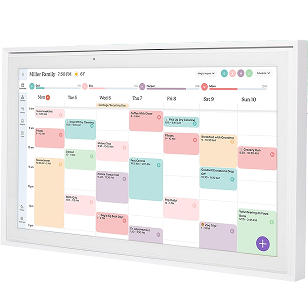
#2 Skylight Digital Calendar with Subscription
A Large, Feature-Rich Calendar with Extra Costs
The Skylight Calendar Max is a solid choice for families who want a high-end display. Its 27-inch HD touchscreen makes schedules easy to read from across the room, and it syncs with Google, Apple, Outlook, Yahoo, and Cozi calendars. It also includes built-in family tools like a chore chart and daily planner, plus mobile app access for updates on the go.
However, many of the advanced features require the optional Skylight Plus subscription, which adds ongoing costs. Compared with our top pick, it’s less intuitive out of the box and carries higher long-term ownership costs.
For households that value a premium display and extra features, it’s a strong contender but it’s not the most straightforward, reliable solution for busy families.
Pros:
- Large 27" HD touchscreen display
- Auto-rotating screen (portrait or landscape)
- Syncs with Google, Apple, Outlook, Yahoo, and Cozi
- Built-in chore chart and daily planner
- Mobile app allows updates from anywhere
- Modern design with interchangeable frame styles
Cons:
- Many advanced features require the Plus Plan subscription
- Higher long-term ownership cost
- Larger screen may not fit all wall spaces
Bottom Line:
The Skylight Calendar Max delivers a premium design and a large, easy-to-read display, making it a strong option for families who want extra style and features. However, several advanced tools require the Plus Plan subscription, which adds ongoing costs and keeps it from taking the top spot.

Top Choice
EUNOIA™ Cortisol Reduction Capsules

4.8 / 5.0
Best for: Balancing cortisol levels and reducing stress naturally. Ideal for those dealing with brain fog, stress eating, burnout, and difficulty relaxing.
The 3 Best Handheld Garment Steamers for Effortless, Wrinkle-Free Style (2025)

Reviewed by:
Matthew White C.E.E, C.Q.E
Written and Edited By SA EDITORIAL TEAM
October 17, 2025
Best Overall Performance & Value
| Format | Easy-to-swallow vegan capsules |
|---|---|
| Key Ingredients | Cordyceps Sinesis Powder (Mycelium), Reishi Mushroom Extract, Shiitake Mushroom Extract, and Lions Mane |
| Use | 2 capsules daily for calm, clarity, and hormonal balance |
| Regular Price | $35.90 for 60 capsules (~ $0.59 per capsule) |
Eunoia blends 10 adaptogenic super mushrooms to help your body manage daily stress naturally and from within. Together, they support balanced cortisol levels, increased energy, better sleep, and lower anxiety. On top of that, it helps reduce bloating and the puffy “cortisol face” look. So you’ll feel and look better.
“It’s not just that I feel calmer, I feel clearer. I’m sleeping better, my stomach’s not as puffy, and I’m not snapping at my kids anymore.”

WHY IS IT THE BEST:
- Naturally fights high cortisol levels
- Helps deal with daily stress
- Provides natural energy boost
- Promotes focus and mental clarity
PROS:
- Naturally sourced Ingredients
- Targets stress, fatigue, bloating, and sleep
- No melatonin or stimulants
- Vegan, sugar-free, gentle on sensitive stomachs
- Results you can feel: Less stress, clearer skin, reduced "cortisol face", and flattened belly
- Best price per capsule ($0.66)
CONS:
- Goes out of stock frequently due to high demand
- Only available online
- Requires consistent daily use


#3 BQQJDD Digital Calendar - Budget-friendly Option
A Budget-Friendly Option
The BQQJDD Digital Calendar is ideal for families who want basic organization tools without paying for premium features. It syncs with Google, iCloud, Outlook, Cozi, and Yahoo, and includes essential tools for tracking chores, appointments, and daily schedules.
During testing, we found the interface slower and setup more involved compared with our top two picks. While it covers the essentials, it lacks the seamless performance, speed, and advanced features of higher-ranked models.
For households prioritizing cost over convenience or premium design, it’s a practical and functional option, but not the most efficient solution for busy families.
Pros:
- Syncs with major calendars – Google, iCloud, Outlook, Cozi, Yahoo
- Dual-band WiFi support – 2.4GHz and 5GHz connectivity
- Flexible setup – includes desktop stand and wall-mount hardware
- Family tools included – chore charts and meal planner
- Digital photo frame functionality – display memories alongside your calendar
- Affordable alternative – budget-friendly compared with premium models
Cons:
- Interface is slower than higher-end models
- Setup can require extra troubleshooting
- Hardware is less powerful than premium options
Bottom Line:
The BQQJDD Digital Calendar provides solid family organization at a lower price point, making it a practical choice for budget-conscious households. However, it doesn’t match the reliability, speed, or advanced features of our top two picks.
Quick Comparison
| Feature | Orca Digital Calendar | Skylight Max | BQQJDD |
|---|---|---|---|
| Syncing | Seamless, multi-platform: Google, Apple, Outlook, Cozi, Yahoo | Reliable, but required subscription may limit features | Google, iCloud, Outlook, Cozi, Yahoo |
| Setup | Ready in minutes: fast, intuitive, plug-and-play | Moderate, some learning curve | Slower, troubleshooting needed |
| Display | Full-month view & color-coded schedules for quick glance across the room | 27" HD touchscreen, large but premium setup required, need to pay more | Standard display, less visibility |
| Family Tools | Built-in chores, task tracking, meal planner, photo frame, all included, no subscription | Chores, daily planner, mobile app access (subscription required for some features) | Chores, meal planner, photo frame |
| Performance | High-powered hardware: Octa-core processor, 4GB RAM, 64GB storage, dual-band WiFi | Good, but less powerful than SRI Homes | Basic, slower performance |
| Hidden Fees | None | Some features require monthly subscription | Yes |
| Best For | Families who want a full, all-in-one command center with reliability, speed, and no surprises | Families wanting a premium display and extra features, willing to pay more | Budget-conscious households needing basic organization |
Why Orca Wins
- All-in-One Command Center – Syncs all calendars, tracks tasks, plans meals, and even displays photos.
- Fast & Reliable – Setup in minutes with no subscription fees, plus high-performance hardware handles everything seamlessly.
- Designed for Families – Color-coded, full-month view keeps everyone on the same page at a glance.
- Premium Advantage – Combines premium features, ease of use, and affordability in a space where competitors either overcharge (Skylight) or under-deliver (BQQJDD).
Orca isn’t just another digital calendar. It’s the only one that delivers real-world performance, complete family tools, and peace of mind in one device.
Final Verdict
Digital wall calendars are meant to simplify family life but many fall short. Syncing glitches, hidden subscription fees, or unreliable hardware can turn a helpful tool into a source of frustration.
After testing multiple models in real households, the Orca Digital Calendar stands out as the most dependable choice. It combines seamless syncing, intuitive family-friendly features, and powerful hardware all without surprise fees or complicated setup.
For families who want one central screen where everyone can see the schedule at a glance, Orca is the most practical and reliable digital calendar we tested.
Frequently Asked Questions
1. Can multiple family members use one digital calendar?
Absolutely. Top models like the Orca Digital Calendar let multiple accounts sync simultaneously. Each family member’s schedule is color-coded and displayed clearly on the same screen, so everyone sees what’s coming up at a glance.
2. Which calendars work with my existing apps?
The best calendars sync seamlessly with Google Calendar, Apple Calendar, Outlook, Cozi, and Yahoo. SRI Homes supports all of these without extra fees or complicated setup, making it simple to bring every family schedule into one central hub.
3. Do I need a subscription to unlock all features?
Not with every model. Some premium devices, like Skylight Calendar Max, require a subscription for advanced features. SRI Homes and BQQJDD provide full family organization tools out of the box with no hidden fees.
4. How hard is setup?
Setup is quick and intuitive on top-tested models. SRI Homes is plug-and-play and ready in under 10 minutes. Other options may require extra steps or app installation, and budget models sometimes need troubleshooting for WiFi connectivity.
5. Can digital calendars display photos or other media?
Yes. Many models, including SRI Homes and BQQJDD, double as a digital photo frame. You can display family photos alongside your schedule without paying extra or subscribing to premium services, turning your calendar into a multifunctional household hub.
6. Are these calendars reliable over time?
High-performing models like SRI Homes are built with durable hardware and fast processors, ensuring smooth operation over months of daily use. Less expensive options may have slower interfaces or occasional freezes, which can interrupt your family planning
7. Can I update or access my calendar remotely?
Yes. Many digital wall calendars allow remote updates via mobile apps. SRI Homes syncs automatically, keeping your schedule current without constant manual updates. Some premium models require a subscription to enable mobile editing.
8. What features help families stay organized?
Look for calendars with chore charts, meal planning, reminders, and task tracking. SRI Homes offers all of these tools in one device without subscription fees, helping families manage everything from school projects to grocery lists in one place.
9. Do these calendars work with all WiFi connections?
Yes. Dual-band WiFi support 2.4GHz and 5GHz ensures stable syncing and updates. This feature is standard on high-performing models like SRI Homes, preventing dropped connections or slow updates.
10. Which calendar is best for busy families?
Based on real-world testing, the SRI Homes Digital Calendar delivers the best balance of reliability, speed, setup simplicity, and family-focused tools. Skylight Max is ideal for those seeking a premium display with extra features, while BQQJDD is a solid, budget-friendly alternative.
Have You Tried a Digital Calendar?
We want to hear from families who use these tools every day.
If you’ve found a digital calendar that truly helps your household stay organized, share your experience with us. Your insights could help other families find the right solution—and make busy days a little easier.
Send us a message and tell us which calendar works best for your family.